5 min read · Published
In short
- Email a theatre list to your own list address, or upload it in the dashboard, and the whole session is created at once.
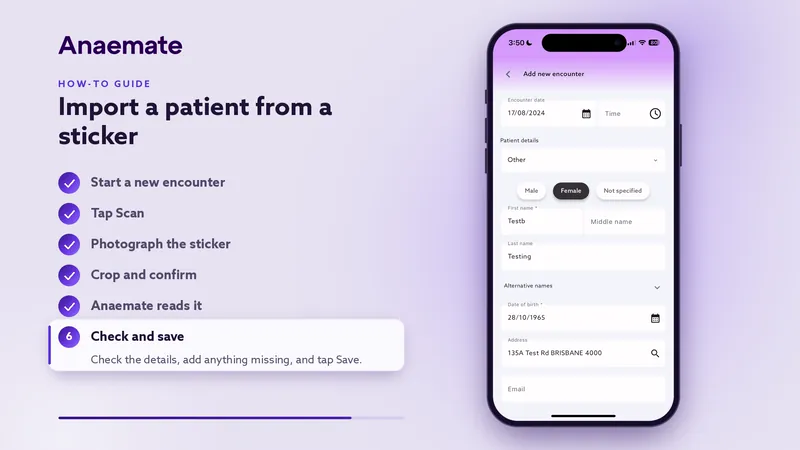
- Photograph a patient sticker in the app and the patient’s details are filled in for you.
- Surgeon lists are read with up to 99.9% accuracy, saving up to 30 minutes per list.
- What the AI reads is checked against Medicare, the health funds and Anaemate’s reference lists before anything is billed.
Two ways in
Every doctor has their own list address. Email the theatre list to it, or upload the list in the dashboard against the doctor, the date and, if you like, the surgeon. PDFs, scans, photos, Word and Excel files are all accepted.
For a single patient, photograph their sticker in the app, or choose the photo from your gallery, and crop to the label.
What it reads
Anaemate uses agentic OCR: trained AI models that read a page the way a person would, handling scans, photographs and awkward print.
- From a list: the hospital, surgeon and date, then each patient’s name, date of birth, contact details, Medicare number, procedure, start time and surgical item numbers
- Each patient’s cover: a private fund, workers’ compensation, a transport accident scheme, DVA, defence or public-in-private
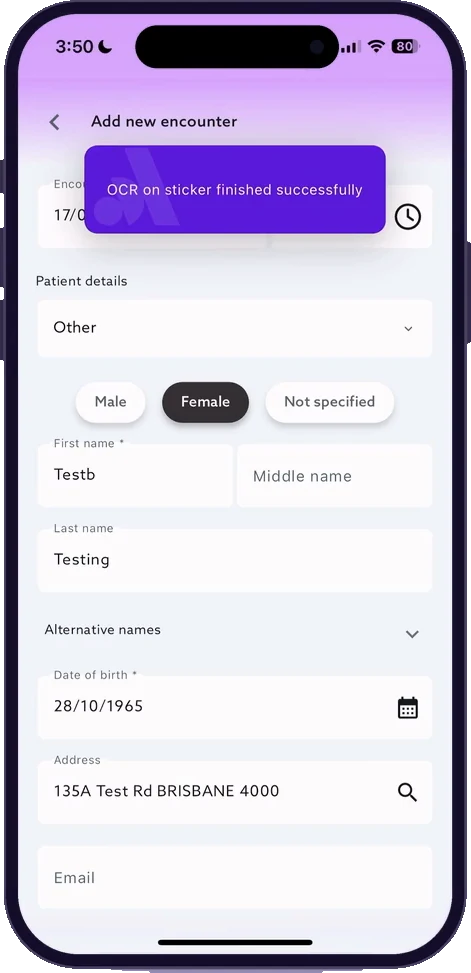
- From a sticker: the patient’s name, date of birth, Medicare number, address, phone, email, fund, referrer and hospital
Checked before it is billed
What the AI reads then goes through Anaemate’s own checks. Medicare numbers are validated, funds and membership numbers are matched against Anaemate’s reference tables, and hospitals and surgeons are matched to the provider directory, which remembers how your lists write them. Cancelled patients are skipped.
Every patient is then verified with Medicare and their health fund. If a check fails, Anaemate tries the corrections Medicare suggests and checks again.
What happens next
Returning patients are matched to their existing record instead of being duplicated, and new patients and encounters are created. If a list has no times, cases are given start times in list order. An email then tells you which encounters were created, updated, removed or skipped.
Send an updated list and the session is updated to match: anyone no longer on it moves to pending cancellation. Where a detail on the list differs from the patient’s record, such as a new mobile number or fund, the case is flagged so you can choose which to keep.
Where people still help
On Anaemate Premium, our team reviews and completes the data entry wherever the AI does not capture everything a case needs.
Scanning a sticker
Start a new encounter
Tap the plus button and choose the encounter type.
Tap Scan
Tap the camera icon next to Scan.
Photograph the sticker
Frame the sticker, take the photo and crop to it.
Check and save
Anaemate fills in the patient’s details. Check them, add anything missing and save.